C Piscine C00

  • 42 Wolfsburg
  • Shell00
  • Shell01
  • C00
  • C01
  • C02
  • C03
  • C04
  • C05
  • C06
  • C07
  • C08
  • Rush01
  • Before you start - IDE Setup

    You can use any IDE you want, I chose VSCode because I am too lazy to set up Neovim lmao.

    If you are also using VSCode I recommend at least these extensions:

    • 42 Header: This let's you quickly insert the header you need to have in every C file you create by pressing CTRL+ALT+H. It also automatically fills in the Updated date when you save the file. Neovim has an equivalent config, I do not know what it was.
    • C/C++ Extension Pack: For syntax highlighting, auto suggestions and general checks. Not needed on Neovim, I think lazyvim comes with it installed already.
    • 42 Norminette: This automatically checks your project for Norme errors while you're coding to avoid silly mistakes. For Neovim you can use the offical 42 norminette CLI, that can be easily installed using pip

    Required

    ex00. ft_putchar

    You need the Unix Standard Library (unistd.h) included in your project to use the write function, this is allowed by the Moulinette throughout the entirety of C00.

    If you need to see how a function works, you can look up it's corresponding POSIX man page using man 3p [functionName] (replace [functionName] with your function name, eg. write)

    Here's the synopsis of write:

           #include <unistd.h>
    
           ssize_t pwrite(int fildes, const void *buf, size_t nbyte,
               off_t offset);
           ssize_t write(int fildes, const void *buf, size_t nbyte);

    You can safely ignore the confusing variable types for now, these will only be more relevant later. They're essentially integers.

    To write to the console you need to set the fildes (File Descriptor) to 1 and set nbytes to how many bytes are in your *buf, so if you have one character, that is 1 byte as per ASCII.

    Notice how *buf has the *, in C this means this is a pointer. You can also safely ignore this being there for now, but basically instead of an actual char or if you're coming from other languages that have string (which doesn't technically exist in C), it expects a memory address that points to the value we want.

    So since we need to take the char c from our function ft_putchar we need to get it's address using the & operator:

    write(1, &c, 1);

    This might seem strange at first, but you'll get used to it after some time.

    Since the function type is void, it doesn't actually return anything, which is fine.

    Now finally to test if your code actually works, you should have a main function, this function of type int always runs first whenever a C program is ran. The reason it's of type int is because per POSIX, a program always returns an integer value that tells the shell or other programs whether the program encountered an error.

    So make sure to return (0); which means success. The brackets are there to please norminette.

    This is what this main function looks like:

    int main()
    {
    	ft_putchar('F');
    	return (0);
    }

    Make sure to not use double quotes (") as those are reserved for char[] (C equivalent of a string)

    A char is not equal to a char[]

    Then compile your C file using gcc as follows in Terminal:

    gcc -Wall -Wextra -Werror ft_putchar.c

    It will create a.out without any output if everything went correctly. This is an executable, you can run it in your terminal and it should output F

    Congratulations, your first C code at 42! Read the C file in this repository for more help.

    Remember that when you submit you should not include your a.out or main function. Remove these or at least comment out the main function before pushing to the Git repo.

    ex01: ft_print_alphabet

    This function prints every character that is a lowercase character. And no you can't just manually type in every letter of course, that would be stupid.

    Instead you have to think about how computers store data. Everything is digital.

    So even characters are somehow mapped to specific numbers. Usually it's ASCII. This is a standard in computing that defines what number equals what character.

    You can find ASCII tables online to see these numbers. But did you know that you don't even need to check what number each thing is? Instead, let's look at the pattern.

    You can see that the lowercase letter 'a' is decimal number 97 in the ASCII table, followed up by lowercase letter 'b' which is decimal number 98.

    In C, char is actually a number internally. So if you add +1 to a char, it jumps to the next one. You can even do number comparisons on them.

    So technically all we need to do is while the character I'm on does not exceed the lowercase letter 'z', write and jump to the next (+1 on the char)

    You can use a while loop to accomplish this easily. Check the C file to see how that looks in action. Once you know this, it should actually be straightforward how to do the remaining mandatory tasks!.. maybe except for ex04

    ex02: ft_print_reverse_alphabet

    Same thing as ex01 but instead of +1 we -1, and instead of checking if it exceeds, we check if it's lower than 'a'

    ex03: ft_print_numbers

    Almost a 1:1 copy of ft_print_alphabet but with different start and end chars. Simple as that!

    ex04: ft_is_negative

    This one is also very simple. We can use if to compare n < 0, if it is, its negative, otherwise using else we can assume it's positive.

    Optional

    ex05: ft_print_comb

    Now this is where it gets trickier, and we need to think before we code.

    The task is to print a combination of 3 digits at a time, seperated by a comma, and each of these 3 digits:

    • cannot repeat
    • cannot occur in the same group again in the next combination

    This is the expected output:
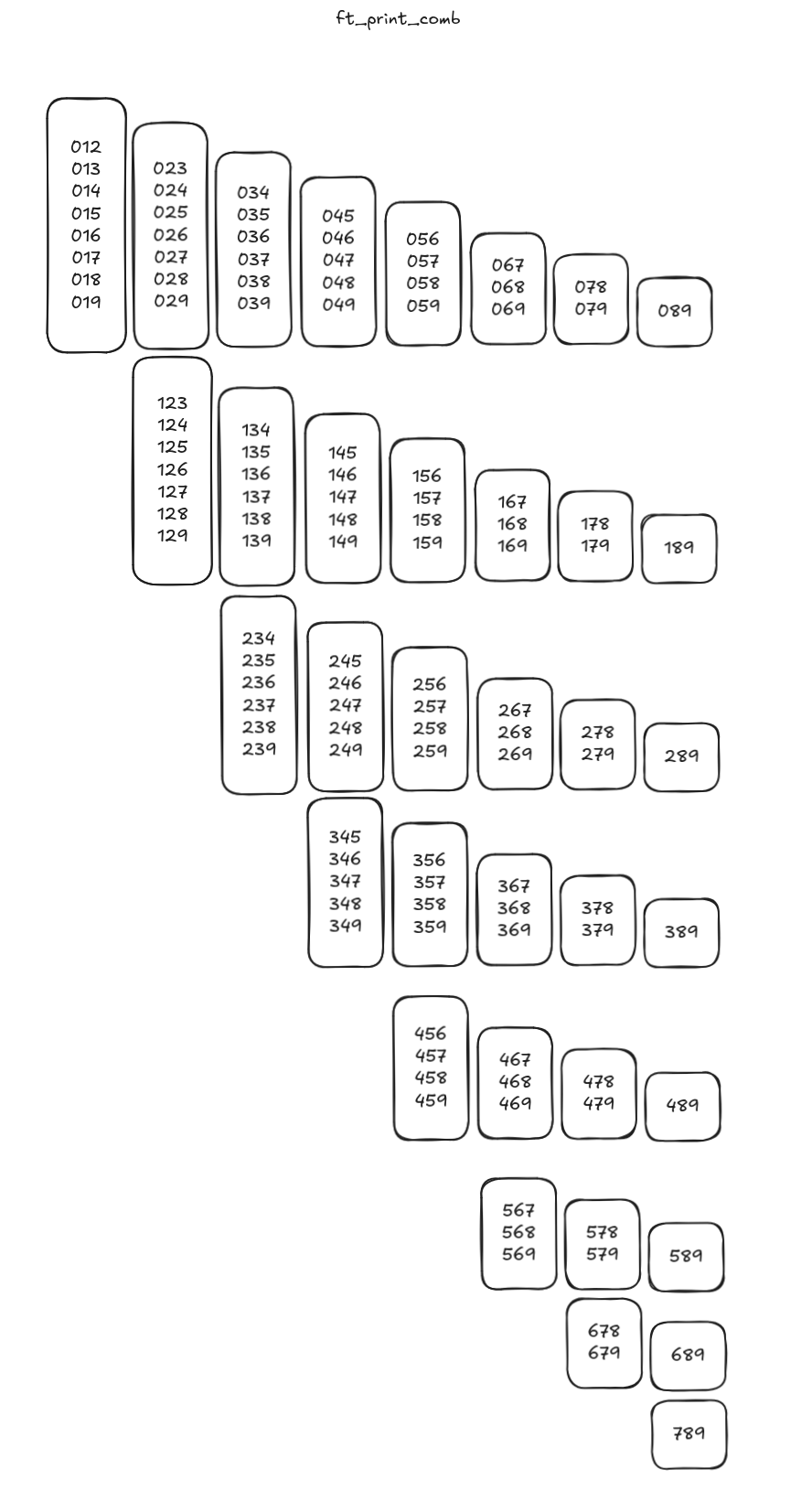
    Output of ft_print_comb visualized

    I pseudo-coded using Python for loops as it's more readable for me:

    cout = ''
    for a in range(8):
      for b in range(a, 9):
        for c in range(b, 10):
          if not (a == c or a == b or b == c):
            if not (a == 0 and b == 1 and c == 2):
              cout += ", "
            cout += f'{a}{b}{c}'
    print(cout)

    Basically how it works is there are 3 loops for each digit, the a loop contains the b loop which contains the c loop

    Each loop starts from it's parent's current int or 0 for a to stop numbers like 021 to appear since we're raising the floor for it.

    This way, c loop will run for the c digit which runs most of the times. when c loop runs out of digits, the b loop iterates and so the c loop is reset, just like how numbers overflow, aaand finally it cascades to a which is the slowest gear.

    Then we just instruct c to print abc if a, b and c are not equal to each other

    The reason I chose 8, 9 and 10 is because Python's range() function ends as soon as it sees the number it was given, if I did 7, 8 and 9 it would stop one number too early.

    But we are not working with Python, and we are not allowed to use for loops as per Norme, so I created:

    • ft_print_digits: a function which turns 3 int digits into their corresponding char ASCII representation and then prints them in order and calls ft_print_comma if neccesary.
    • ft_print_comb: the function that houses our 3 nested while loops and a, b and c variables
    • ft_print_comma: a function that just prints a comma for seperation.

    You can see the code in the C file for it if you're completely helpless but this should be enough info so you can write it yourself, maybe look up syntax for the and/or operators, while loops and if statements in C.

    ex06: ft_print_comb2

    This one was a bit more difficult than I anticipated. It would be a port of the one in ex05 if it weren't for the 25 line limit for functions...

    But the way I ended up doing it is by using some simple math

    Basically I have only one int named a that grows from 1 all the way to 9899 (because that's the largest number where the first half is lower than the second half), and then to print it, I made a new ft_print_digits that derives ca, cb, cc and cd which are the char passed to write by doing:

    char ca
    char cb
    char cc
    char cd
    
    ca = '0' + (a / 1000) % 10
    cb = '0' + (a / 100) % 10
    cc = '0' + (a / 10) % 10
    cd = '0' + (a) % 10

    And then I was able to output them without issue, I just needed to use write constantly and add a space in between cb and cc and a comma after cd if a < 9899 since that's the final number.

    Then all my loop does is it gets the left half of a by dividing it by 100 and the right half using a modulo 100, checks if left is smaller than right before printing it because left cannot be larger than right, and that's it.

    ex07: ft_putnbr

    I solved this one through recursion.

    Basically when the function is first run, it checks if the number entered is -2147483648 because this is the overflow point for int, so it would cause unintended behavior if we try to calculate it. For this special case number we manually do the write.

    If it is not, then we go on to check if the number is negative, and if it is we need to put a dash so it shows up as negative, then we set nb = -nb which basically makes it positive so we can work with it, otherwise the algorithm will fail.

    Then if the number only has 1 digit (more or equal to 0 and less than 10) we can easily reuse ft_putchar again to output that. Otherwise, we will call ft_putnbr again, this time dividing nb by 10 so we remove the rightmost digit and do the same procedure on top of it again, and this keeps repeating until we only have one digit we can output using ft_putchar. Then after all these recursive operations, it does the same but this time using the % operator, which does the opposite of division by 10: it removes the leftmost digit. And this way, both halves are eventually reduced to single characters that can be outputted using ft_putchar, leading to our number!

    ex08: ft_print_combn

    The code is probably the most complicated, it consists of a recursive function to print digits (ft_print_digits), a validation function (ft_isasc), a helper to calculate the maximum boundary (ft_max), and the main ft_print_combn.

    ft_print_combn first uses ft_max to dynamically build the exact maximum valid combination for n. For example, if n=3, it calculates 10-3 to start at 7 and loops up to 9, building the integer 789.

    Then we calculate the exact starting number a based on n by looping from 0 to n-1 (for n=3, it builds the integer 12, representing 012). The first valid number is printed immediately using ft_print_digits so we don't have to worry about a leading comma on the first iteration.

    After printing the first number, we enter a while loop that increments a by 1 (a++) until it reaches our calculated maximum number.

    Instead of trying to mathematically calculate jumps to skip invalid numbers, we pass a and n to ft_isasc. This function extracts the digits from right to left using the % operator and checks if every digit is strictly smaller than the one to its right. If the number is not strictly ascending (like 10) or repeats digits (like 11), ft_isasc returns 0 and the loop skips it.

    If ft_isasc returns 1, we print a comma directly using write and then the valid digits using ft_print_digits. This cycle repeats until a hits our exact maximum bound.

    Browse source files 10 files in C00. They open in Notepad.

    This page is C00's notes, rendered here from the README on GitHub. Last read on 19 October 2026 at 04:32 UTC.


    hand coded
